

WhiteHart Login and Registration
Logging in and registering gives you access to a personal account area where you can manage your details, check your profile status and return to the sections you need. White Hart Casino provides separate Log In and Sign Up tabs, allowing new visitors to choose the appropriate option straight away. To create an account, you will need an email address, password, phone number, country and currency. Once logged in, your main settings are available through your account dashboard, without having to complete the registration form again.
How to Log In to an Existing Account
The Login button at the top of the website opens the authentication form. Select the Log In tab, enter the email address used during registration and provide your password. These details connect your session to your account. After successfully logging in, you can return to your profile settings, check your personal information or access the relevant section of the website.
The WhiteHart Casino Login page is designed for both regular visitors and users returning after a break. There is no need to register again: simply enter your existing login credentials.
Creating an Account: From Registration to Your First Login
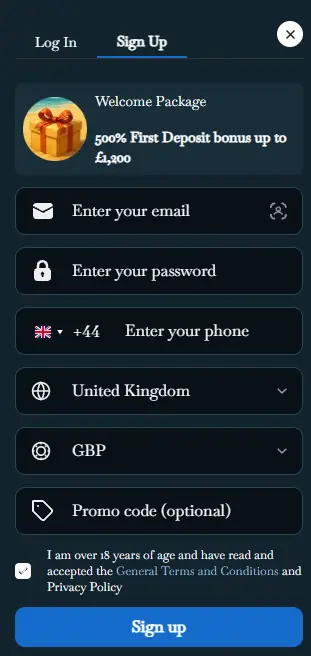
At White Hart Casino, the registration window includes a Sign Up tab. The first screen contains fields for your email address, password and phone number, along with drop-down menus for selecting your country and currency. For a British account, you can select United Kingdom and GBP. A separate Promo code (optional) field allows you to enter a promotional code if you have one, although completing it is not compulsory. Information about the welcome offer appears alongside the form, but the main purpose of this stage is to create an account with accurate details.
Step-by-Step Registration Instructions
- Open Sign Up and enter a valid email address that you can access.
- Create a unique password for your account, using a combination of different character types.
- Enter your phone number, check the international dialling code and select your country of residence.
- Choose your account currency, such as GBP, and enter a promotional code if you have one.
- Confirm that you are at least 18 years old, review the terms and conditions and privacy policy, then click Sign up.
At White Hart Casino, your registration details should match your official documents to make subsequent identity verification more straightforward. Pay particular attention to your country and currency selections before completing the process.
What You Can Access in Your Account Dashboard
Your profile is the central location for personal settings, rather than simply a page displaying your name. At White Hart Casino, your account provides convenient access to personal information, your balance, transaction history and available settings. The position of individual menu items may differ between desktop and mobile layouts, but the navigation remains straightforward: open your account first, then select the section you need.
| Account Feature | What You Can Use It For |
|---|---|
| Personal Details | Check your contact information and account settings. |
| Balance | View your available funds in your selected currency. |
| Activity History | Review information about previous actions and transactions. |
| Verification Status | Keep track of the stages of account verification. |
| Support | Get assistance with logging in and managing your settings. |
White Hart Casino allows users to treat their account dashboard as a central hub for managing their profile.
Logging In From Your Smartphone Without Unnecessary Steps
Mobile login uses the same account as the desktop version. Open the website in your smartphone browser, tap Login and navigate to the email and password fields. The compact form is designed for convenient use with a touchscreen keyboard. Once you have successfully logged in, you can open your account dashboard and continue managing your personal settings.
At White Hart Casino, you do not need to create a separate mobile account. If you registered on a laptop, use the same email address and password on your phone.
Useful Habits When Logging In From Different Devices
- Always use your own login credentials when starting a new session.
- Check the email address before logging in if your browser automatically fills in the field.
- Store your password in a reliable password manager rather than in unsecured notes.
- Log out after using a shared or someone else's device.
Recovering Account Access Through Email
If you need to reset your password, use the recovery option on the login page. The system sends instructions to the email address associated with your account. Open the message, follow the provided link and create a new password. Then return to the login form and sign in using your updated credentials.
For WhiteHart Casino Login, having access to the email inbox originally provided during Sign Up is particularly important. Before requesting a password reset, make sure you have entered the correct address. If necessary, check your spam and junk folders for automated messages.
Identity Verification and Keeping Your Details Up to Date
Identity verification helps establish that an account belongs to its registered owner. At White Hart Casino, the verification process may require proof of identity, proof of address and information about the payment method used. The exact documents depend on the individual request. Prepare clear, readable copies containing up-to-date information, and check that your name and address match the details provided during registration before submitting them.
Consistency is important throughout the KYC process. For example, if your address has changed after moving home, it is advisable to clarify how to update it before submitting documents. White Hart Casino requires users to be at least 18 years old and may carry out age verification.
Account Security Starts With Your Personal Settings
It is advisable to create a unique password that you do not use for other services. A long combination of words, numbers and special characters can be stored conveniently in a password manager while making unauthorised access more difficult. At White Hart Casino, keeping your contact information accurate is an important part of managing your account securely.
- Choose a password that differs from those used for your email and social media accounts.
- Never share verification codes, passwords or recovery links with anyone else.
- Update your contact information whenever it changes.
- Use your own device when handling sensitive account information.
- Check the website address before entering your login credentials.
Two Practical Scenarios for Account Holders
Updating Contact Details After Changing Your Phone Number
Imagine you have changed your phone number but still have access to your registered email address. Log in to your account, open your personal settings and check which number is currently listed. If the field cannot be edited, contact Live Chat and ask for instructions on updating it. The platform's support team operates in English and can help you understand the requirements for changing your account details.
Checking Your Details Before Account Verification
Another example involves preparing for identity verification after registration. First, compare your name, date of birth and address with your official documents. Then make sure you can access your registered email inbox. If you need clarification about the required document format, ask Live Chat before submitting anything. Following these steps helps you organise the verification process and maintain consistent personal information.
An Account You Can Easily Return To
White Hart Casino brings together a straightforward login process, clear registration steps and personal account settings in one convenient experience. Start by creating an account, or open the Log In tab if you already have one. Check your contact details, save a secure password and contact support whenever you need assistance. This makes it easier to return directly to the section you need during future visits.
FAQ
Can I register at WhiteHart Casino without a promo code?
Yes, the Promo code (optional) field in the registration form is not compulsory. You only need to provide an email address, create a password, enter your phone number and select your country and currency. Once you have reviewed the platform's terms and confirmed that you are at least 18 years old, you can complete your registration.
Can I change my account currency after registration?
You select your currency when creating an account. GBP is available for users in the United Kingdom. If you need to change this setting after registration, contact Live Chat to find out whether a currency change is possible and what steps are required.
Can I use the same WhiteHart Casino account on my phone and computer?
Yes, you can use the same email address and password to log in from different devices. There is no need to create an additional account for your smartphone. Simply open the website in your mobile browser, tap Login and enter your credentials.
What should I do if I can no longer access the email address used during registration?
Contact customer support through Live Chat and explain the situation. The support team can advise you on identity verification requirements and possible ways to recover access. You may need to provide personal information or documents to confirm that you are the account holder.
Can I correct mistakes in my personal details after creating an account?
If you entered an incorrect name, date of birth or address during registration, contact WhiteHart Casino support. Explain which details need updating. You may be asked to provide proof of identity or proof of address to confirm the correct information.