

WhiteHart Casino Mobile App
The mobile version of WhiteHart allows players to access the casino from their smartphones without changing their existing accounts. On a compact screen, users can access the menu, game search, login, personal account and customer support. The platform adapts its main sections for touchscreen navigation, whilst browser access is suitable for both Android and iOS users. Mobile access is ideal for anyone who wants to use the platform without unnecessary setup.
An Interface Designed for Smaller Screens
On mobile devices, the WhiteHart menu opens via an icon in the upper corner, whilst essential functions remain within easy reach: search, account login and category navigation. Game cards can be browsed with a swipe. The homepage features Live Games, New Games, Big Wins and Top Games, making it easy to switch between sections.
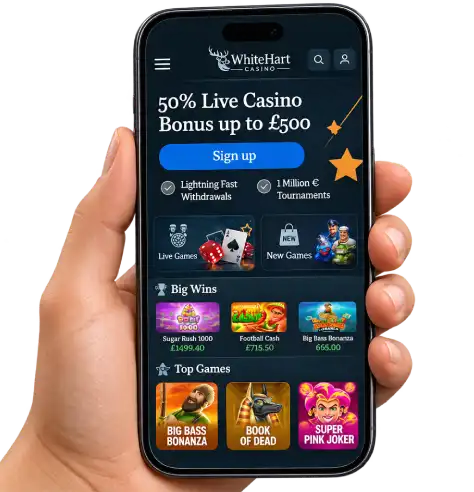
The visual hierarchy helps users distinguish between buttons, cards and category names. WhiteHart Casino retains its recognisable dark design on smartphones whilst using a vertical layout instead of desktop-style columns. This makes it convenient for shorter sessions.
Android: Access Through Your Regular Browser
For Android smartphones, the simplest way to access WhiteHart is through Chrome or another compatible browser. The page automatically adjusts to the screen width, whilst the touchscreen menu provides access to login, search and other essential features. A separate APK installation is not required for this method of access. Check the official website for any additional options.
WhiteHart can be added to your browser bookmarks, so there is no need to enter the website address manually. On some Android devices, the browser also allows users to place a website shortcut on the home screen. This is a website shortcut rather than confirmation that a separate application has been installed. It provides quicker access to the casino lobby.
iPhone and iPad: The Same Account in Safari
On iOS devices, the mobile version of WhiteHart Casino can be accessed through Safari. The vertical layout works well on iPhones, whilst iPads can display more game cards simultaneously. To switch between devices, simply use the same account credentials. There is no need to create a separate profile for each device or search for an unverified application in the App Store.
WhiteHart Casino Mobile App refers to convenient smartphone access in this context, rather than a promise of a dedicated application. Safari allows users to bookmark the website or add a shortcut to the home screen. Website updates are delivered directly through the browser.
Three Steps to Access the Mobile Lobby
Getting started on a smartphone requires just a few straightforward steps.
- 1
Open the Mobile Website
Launch Chrome or Safari, visit the website and check that the smartphone-friendly navigation menu appears.
- 2
Log In to Your Account
Select Login and enter your email address and password. If you do not have an account yet, use the Sign Up tab.
- 3
Choose Your Preferred Section
Use the menu or search function to open a gaming category, personal settings or customer support.
What You Can Do on Your Phone
The WhiteHart Casino mobile website offers more than access to the homepage. The menu allows users to navigate to their accounts, favourite games, the Promotions section and the cashier. All these features are available within a single interface.
| Mobile Feature | Practical Use |
|---|---|
| Menu and Search | Browse categories and search for specific titles. |
| Personal Account | Check account settings and available balance. |
| Promotions | Review current promotional terms on a smaller screen. |
| Cashier | Access payment methods available for your account. |
| Live Chat | Ask questions about your account and website features. |
Game Cards and Touchscreen Controls
In the WhiteHart Casino mobile lobby, slots and live dealer games appear as cards featuring cover images. Players can swipe through collections, select a title and launch a game with a tap. Familiar examples include Big Bass Bonanza, Book of Dead and Super Pink Joker. Screen orientation depends on the individual game.
- Tap a game card to open your chosen title.
- Use the search function when you know the exact game name.
- Check the screen orientation for the most convenient control layout.
- Adjust the brightness or browser zoom if necessary.
How the Mobile Experience Differs from Desktop
The main difference lies in screen organisation rather than account functionality. A laptop displays more game cards, whilst a smartphone places navigation inside a compact menu. WhiteHart maintains a consistent approach to account access, allowing users to switch between devices according to their preferences.
| Feature | Smartphone | Computer |
|---|---|---|
| Navigation | Compact menu | Wider navigation panel |
| Controls | Taps and swipes | Mouse and keyboard |
| Account | Same account | Same account |
| Game Catalogue | Vertically arranged cards | More cards displayed per row |
Browser or Installed App: Which Should You Choose?
The browser version does not require an installation file and uses only the usual browser storage space. An installed App generally has its own dedicated icon. For WhiteHart, mobile browser access is the confirmed option, so APK installation instructions or app store links are unnecessary here. The simplest approach is to open the website directly and save it as a bookmark if preferred.
How to Save a Quick Access Shortcut
- Open the website in your smartphone browser.
- Add the page to your bookmarks.
- Use the saved link the next time you want to log in.
Account Security and Convenient Settings
On smartphones, a strong password, screen lock and up-to-date browser are particularly useful security measures. Never share your login details and always log out when using a shared device. If you need to reset your password, use the recovery option linked to your registered email address. Assistance is available through the English-language Live Chat.
- Keep your browser and operating system updated.
- Save the website address in your personal bookmarks.
- Use your own email address and a unique password to log in.
- Check your WhiteHart account details before important actions.
To find what you need more quickly, WhiteHart recommends searching by game title instead of scrolling through the entire catalogue. Portrait orientation is particularly convenient for using Live Chat.
Quick Checks Before Logging In
- Make sure the website address is correct.
- Update your browser if necessary.
- Enter your account details and open the menu.
Mobile Access That Fits Your Routine
WhiteHart Casino Mobile App provides a convenient way to access the platform on a smartphone: open your browser, log in to your existing account and select the section you need. WhiteHart combines compact navigation, touchscreen controls and access to personal settings from your phone. Bookmark the website to make returning to it easier on Android or iPhone.
FAQ
Do I need to install WhiteHart Casino Mobile App on my smartphone?
You can use the mobile version of the casino without installing a separate application. Simply open the website through Chrome on Android or Safari on iPhone. The browser version provides access to games, your personal account, promotions and customer support.
How do I add WhiteHart Casino to my phone's home screen?
On Android, open the website in Chrome, tap the browser menu and select "Add to Home screen" if the option is available. On iPhone, use the Share menu in Safari and select the corresponding option. The shortcut allows you to open the mobile website without entering the address again.
Will my progress and balance remain available when switching from a computer to a phone?
Yes, the mobile and desktop versions use the same account. After logging in with the same email address and password, users can access their balance, personal settings and transaction history. There is no need to create a new account for smartphone access.
Can I play Live Casino games on my smartphone in landscape mode?
The mobile version of WhiteHart supports live dealer games, including roulette and blackjack. Landscape display availability depends on the individual game and its interface. For a more comfortable viewing experience, rotate your smartphone and check how the video stream and controls are arranged.
Why do mobile games load slowly, and how can I improve performance?
Loading speed depends on your internet connection, smartphone performance and browser. For more stable gameplay, use Wi-Fi or a reliable mobile data connection, keep Chrome or Safari updated and close unnecessary tabs. You can also clear your browser cache if pages are not displaying correctly.
Can I access bonuses and Live Chat through the mobile version?
Yes, the WhiteHart Casino mobile browser version allows users to open the Promotions section, review available bonuses and access their personal accounts. English-language Live Chat is available for questions about accounts, promotional activation or platform functionality without switching to a computer.